
1. Chronological Drilling Telemetry & Dynamics Monitoring
During directional drilling, Logging-While-Drilling (LWD), and Measurement-While-Drilling (MWD) operations, downhole sensor subs and surface rig instrumentation broadcast high-frequency telemetry at sub-second to minute intervals. Analyzing drilling telemetry chronologically over Time (UTC) is vital for diagnosing transient mechanics, detecting early fluid kicks or circulation losses, identifying bit bounce and stick-slip vibrations, and evaluating rig crew performance during pipe connections and wiper trips.
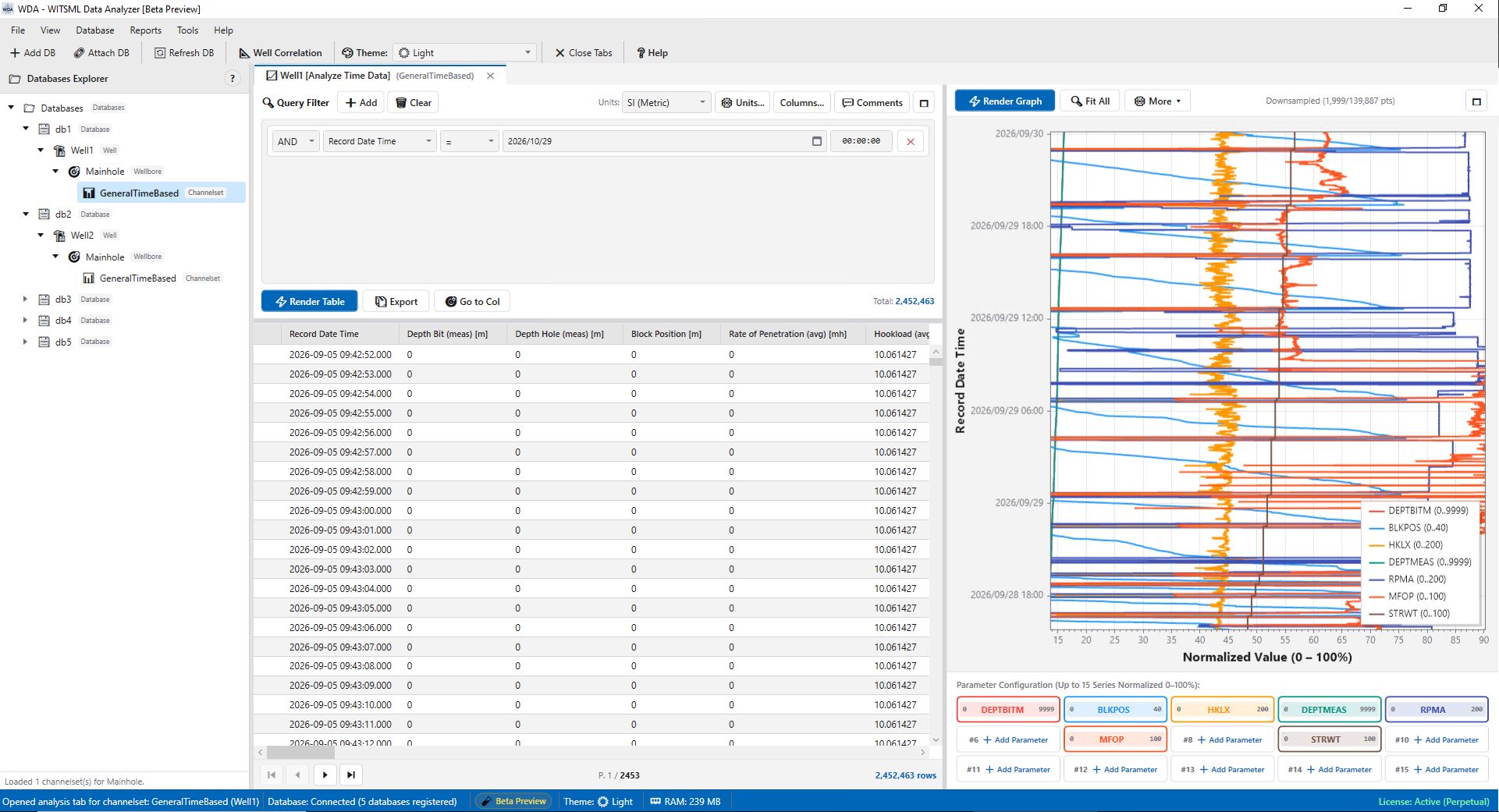
The WDA Time Analysis Console (accessed directly from the Databases Explorer tree by right-clicking any Channelset and selecting Analyze Time Data) provides a responsive, split-view analytical environment that pairs a powerful, SQL-driven Data Panel (criteria query builder and virtualized data table) with a 60-FPS hardware-accelerated Graph Panel supporting up to 15 simultaneous parameter channels.
2. 15-Parameter Slot Strip Chart Architecture
WDA's strip chart canvas is powered by an optimized, hardware-accelerated rendering engine capable of displaying up to 15 concurrent channels without frame drops:
-
Modular Slot State Controller:
Each of the 15 parameter slots functions as an independent multi-state channel card. Users can assign curves, choose custom color palettes, adjust line thickness, set minimum/maximum boundaries, or temporarily hide curves to eliminate visual clutter without losing settings. -
Dual Linear & Logarithmic Scaling:
Assign linear scaling for bounded mechanical variables (e.g.WOB0–50 klbf,RPM0–200 rpm,SPP0–5,000 psi) or multi-decade logarithmic scaling (0.1 to 100,000 ppm) for total mud gas, chromatographic components (C1–C5), and formation resistivity. -
Interactive Navigation & Floating Crosshair:
Seamlessly pan horizontally across days of drilling using right-click drag, or scroll the mouse wheel to zoom into exact operational events. Hovering over any curve activates an interactive crosshair that snaps to the nearest data point, reporting exact timestamps and numerical readings. -
Workspace Maximize Toggles:
Both the Data Panel and Graph Panel feature instant maximize toggles (🗖). Collapse the table to expand the graphic strip chart to 100% full-screen monitor width during intensive monitoring sessions.
3. Interactive Drilling Comments & Synchronized Navigation
Drilling remarks, driller tour sheet entries, mud-logging descriptions, and operational notes provide critical qualitative context for quantitative sensor measurements. WDA delivers an interactive, dual-mode drilling comments system synchronized across both graphical strip charts and the telemetry data grid:
-
Chronological Comment Markers on the Graph:
Imported drilling comments, remarks, and driller notes are plotted directly on the strip chart canvas at their exact chronological timestamps. Hovering over any comment pin reveals a rich tooltip card displaying the exact timestamp, bit depth, hole depth, activity summary, and the full comment text. Through the Comments Settings dialog, engineers can configure marker colors, toggle comment labels, and customize font sizes for optimal visibility. -
Searchable Drilling Comments Drawer (List View):
Clicking the 💬 Comments button on the Data Panel instantly opens a dedicated slide-out drawer displaying all ingested remarks in a structured, paginated table. Engineers can search and filter comments in real time by UTC date/time (e.g.2023-05-18) or keyword text (e.g., "lost circulation", "connection", "tight hole", "bit trip"). -
Click-to-Record Synchronized Grid Navigation:
Every comment in the drawer features an interactive jump-to-record navigation action. Clicking or double-clicking any comment in the list (or clicking the target icon) instantly jumps and scrolls the main virtualized Data Grid directly to the corresponding time-based telemetry record for that exact comment timestamp, while simultaneously snapping the strip chart crosshair to that precise operational moment. -
Detailed Comment Inspector:
Engineers can open the rich Comment Details modal for any entry to inspect complete metadata, including source WITSML message identifiers, rig activity codes, author remarks, and depth attributes.
4. SQL-Driven Criteria Query Builder & Virtualized Grid
Rather than forcing engineers to scroll through millions of raw rows, WDA's embedded query builder allows surgical data filtering directly against the local high-performance database:
-
Visual Filter Criteria Constructor:
Chain compound logical statements withANDandORlogic. Apply relational operators (=,!=,>,>=,<,<=,Between) across any numeric channel or UTC timestamp. -
Context-Aware DateTime & Range Inputs:
Select time intervals using calendar pickers and exactHH:mm:ssinputs, or specify numeric ranges to isolate specific drilling scenarios (e.g.,ROP > 35 m/hr AND SPP > 2,800 psi). -
High-Performance Virtualized DataGrid:
Tabular results render using UI virtualization, ensuring that queries returning 500,000+ rows scroll effortlessly. Clicking any row immediately highlights that exact time point on the graph. -
On-the-Fly Unit Profile Conversions:
Switch between Imperial Oilfield and Metric units instantly. The grid automatically updates all values and column unit headers according to API RP 66 standards.
5. Operational Applications: Drilling Mechanics & Well Integrity
Real-time chronological analysis is essential for identifying critical drilling events before they escalate into non-productive time (NPT) or safety incidents:
-
Connection Gas & Swabbing Detection: Overlay Hookload (
HKLD), Flow In/Out, and Total Gas. Spikes in gas after circulating bottoms-up reveal formation pore pressure trends, while pit gains during pipe movement indicate swabbing. - Drill Bit Bounce & Stick-Slip: Correlate high-frequency fluctuations in Rotary Torque and WOB with surface RPM to diagnose severe torsional vibration and prevent downhole cutter shearing.
-
Hole Cleaning & Pack-Off Warning: Sudden increases in Standpipe Pressure (
SPP) accompanied by erratic torque and declining ROP provide early indicators of cuttings accumulation and imminent borehole pack-off.
6. Related WDA Engineering Modules
- WDA: WITSML Compatible Data Analyzer: Discover WDA's high-speed architecture and integrated wellbore tools.
- Time-to-Depth Conversion Engine: Resample your time-series channels onto uniform petrophysical depth grids.
- Daily Drilling Reports (DDR): Aggregate 24-hour sensor min/max/average statistics directly into IADC tour sheets.
- Dynamic Report Generator & Crossplots: Build multi-parameter crossplots and correlation graphs.
With the WDA Time Analysis Console, drilling teams gain instantaneous visibility into sensor dynamics and operational remarks, ensuring safer, faster, and more efficient well construction.